Webhooks
Introduction
The Toro Management API offers webhooks to notify you in real-time when certain events happen in your account. At their core they are just a POST request to a pre-determined endpoint. The endpoint can be whatever you want, and you can register them through our API. For example, if you receive webhooks from Acme Inc., you can structure your URL like: https://www.example.com/acme/webhooks/. The way to indicate that a webhook has been processed is by returning a 2xx (status code 200-299) response to the webhook message within a reasonable time-frame (15s). It's also important to disable CSRF protection for this endpoint if the framework you use enables them by default. Another important aspect of handling webhooks is to verify the signature and timestamp when processing them. You can learn more about it in the signature verification section.
Event Catalog
Our webhooks functionality is still in early development. We intend to support more event types in due course. If there are any event types you'd like us to prioritise, please feel free to let us know.
Event Type | Description |
|---|---|
receipt.created | A receipt is created in the system when a transaction (purchase or refund) is in its final state (typically approved or declined). |
Creating an Endpoint
In order to start listening to events, you will need to register your endpoint through our API as below.
curl --request POST \
  --url https://mgmt-api.torogateway.dev/v1/webhook-endpoints \
  --header 'API-Key: <KEY>' \
  --header 'content-type: application/json' \
  --data '{
  "name": "My Wonderful Webhook Endpoint",
  "url": "https://www.example.com/toro/webhooks",
  "event_types": [
    "receipt.created"
  ]
}'
Testing Endpoints
Once you've added an endpoint, you'll want to make sure its working.
The easiest way to do this is by creating a dashboard session, which can then be accessed through the browser where you can send test events to your API on demand.
curl --request POST \
  --url https://mgmt-api.torogateway.dev/v1/webhook-endpoints/dashboard-sessions \
  --header 'API-Key: <KEY>' \
}'
You should see the endpoint you just created under "Endpoints" on the dashboard.

You can then click on your endpoint and go to the "Testing" tab.
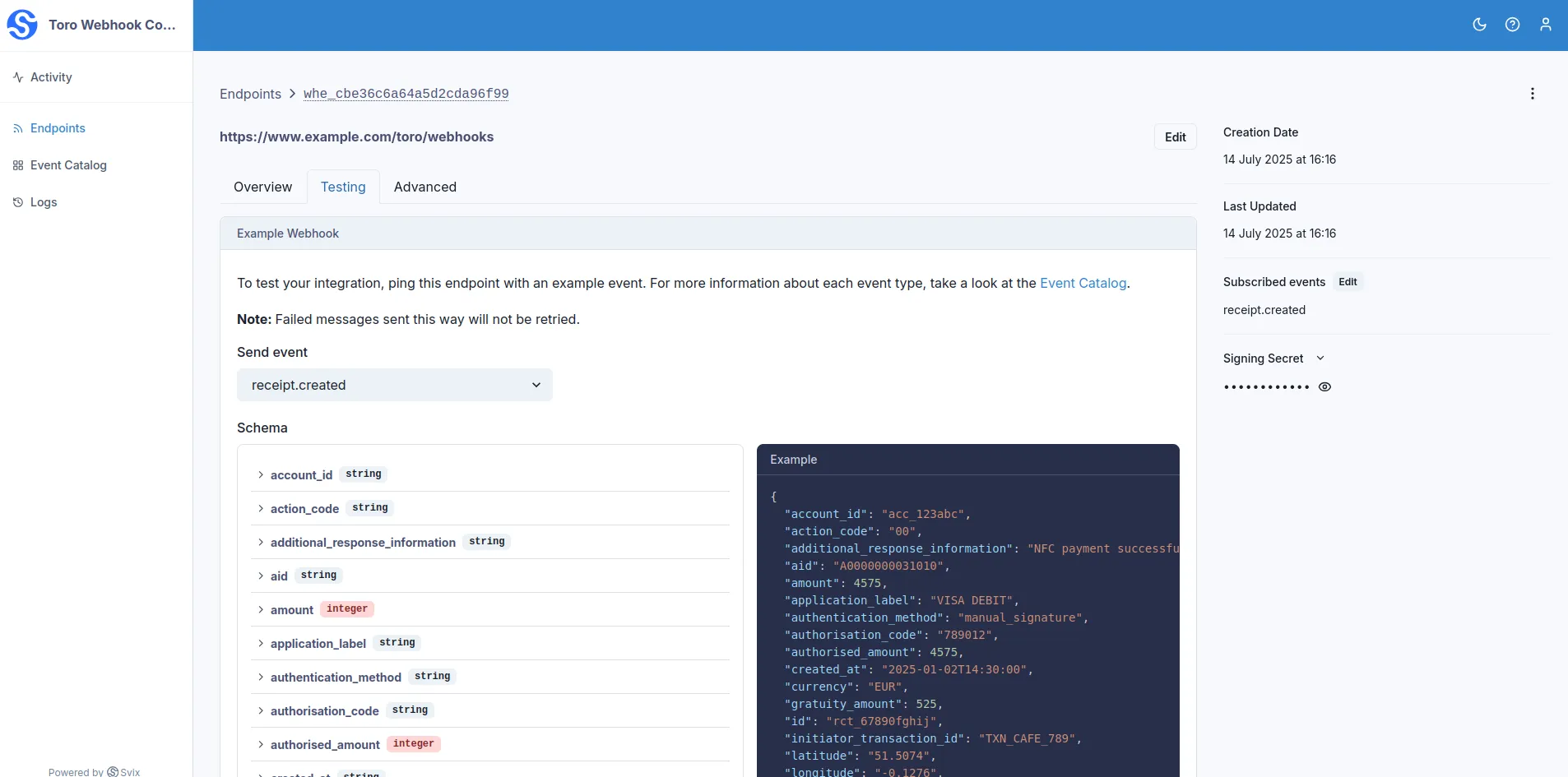
From here, select the event type you want to test out and press the "Send Example" button.

You should now see that a "Message Attempt" has been created, which you can retry as needed until it has been successfully delivered (your API has responded with a 2xx status code).
Signature Verification
Webhook signatures let you verify that webhook messages are actually sent by us and not a malicious actor.
For a more detailed explanation, check out this article on why you should verify webhooks.
Our webhook partner Svix offers a set of useful libraries that make verifying webhooks very simple. Here is a an example using Javascript:
import { Webhook } from "svix";

const secret = process.env.WEBHOOK_SECRET // This was in the response when you created the endpoint

// These were all sent from the server
const headers = {
"svix-id": "msg_p5jXN8AQM9LWM0D4loKWxJek",
"svix-timestamp": "1614265330",
"svix-signature": "v1,g0hM9SsE+OTPJTGt/tmIKtSyZlE3uFJELVlNIOLJ1OE=",
};
const payload = '{"test": 2432232314}';

const wh = new Webhook(secret);
// Throws on error, returns the verified content on success
const payload = wh.verify(payload, headers);
For more instructions and examples of how to verify signatures, check out their webhook verification documentation.
Retries
We attempts to deliver each webhook message based on a retry schedule with exponential backoff.
The schedule
Each message is attempted based on the following schedule, where each period is started following the failure of the preceding attempt:
- Immediately
- 5 seconds
- 5 minutes
- 30 minutes
- 2 hours
- 5 hours
- 10 hours
- 10 hours (in addition to the previous)
If an endpoint is removed or disabled delivery attempts to the endpoint will be disabled as well.
For example, an attempt that fails three times before eventually succeeding will be delivered roughly 35 minutes and 5 seconds following the first attempt.
Manual retries
You can also use the application portal to manually retry each message at any time, or automatically retry ("Recover") all failed messages starting from a given date.
Troubleshooting
There are some common reasons why your webhook endpoint is failing: 1. Not using the raw payload body This is the most common issue. When generating the signed content, we use the raw string body of the message payload. If you convert JSON payloads into strings using methods like stringify, different implementations may produce different string representations of the JSON object, which can lead to discrepancies when verifying the signature. It's crucial to verify the payload exactly as it was sent, byte-for-byte or string-for-string, to ensure accurate verification. 2. Missing the secret key From time to time we see people simple using the wrong secret key. Remember that keys are unique to endpoints. 3. Sending the wrong response codes When we receive a response with a 2xx status code, we interpret that as a successful delivery even if you indicate a failure in the response payload. Make sure to use the right response status codes so we know when message are supposed to succeed vs fail. 4. Responses timing out We will consider any message that fails to send a response within 15s a failed message. If your endpoint is also processing complicated workflows, it may timeout and result in failed messages. We suggest having your endpoint simply receive the message and add it to a queue to be processed asynchronously so you can respond promptly and avoiding getting timed out.